
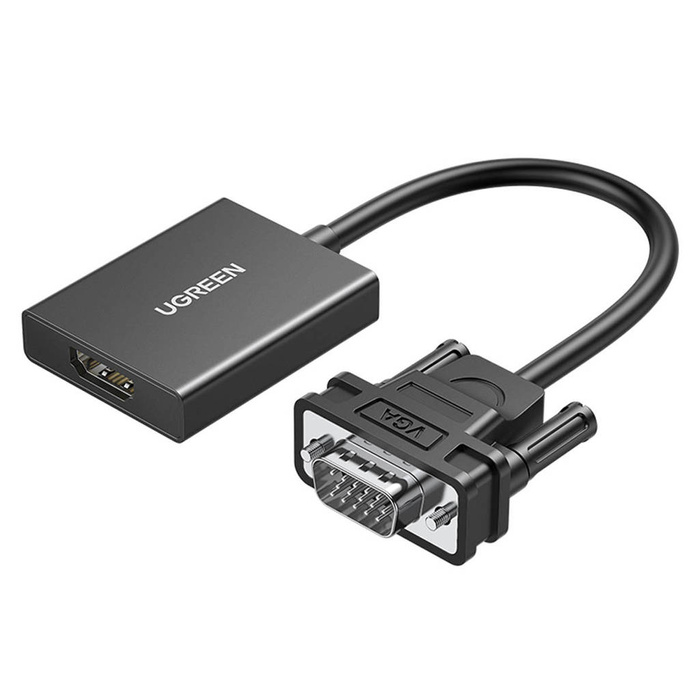
UGREEN VGA to HDMI Adapter – CM513
Original price was: KSh 2,000.00.KSh 1,800.00Current price is: KSh 1,800.00.
UGREEN VGA to HDMI Adapter – CM513
Input: VGA (analog video) + 3.5 mm audio input jack
Output: HDMI (digital video + audio)
Resolution Support: Up to 1920 × 1080 @ 60 Hz (Full HD)
Audio Support: Transmits audio via the 3.5 mm input into the HDMI output
UGREEN VGA to HDMI Adapter – CM513
This adapter converts a VGA signal from an older device (like a PC or laptop with only VGA output) into a digital HDMI signal for use with modern displays such as TVs, HDMI monitors, or projectors. It’s a one-way converter — VGA to HDMI only (not the reverse).
Features
Input: VGA (analog video) + 3.5 mm audio input jack
Output: HDMI (digital video + audio)
Resolution Support: Up to 1920 × 1080 @ 60 Hz (Full HD)
Audio Support: Transmits audio via the 3.5 mm input into the HDMI output
Power: USB-C 5 V/1 A input (required for signal processing)
Direction: One-way conversion from VGA → HDMI
Plug & Play: No drivers needed, hot-pluggable
Compatibility: Works with Windows, macOS, Linux, and many VGA devices
Compact & Portable: Short adapter cable (~0.15 m) for easy use and travel
How It Works
Connect your VGA output device (e.g., older laptop or desktop) to the VGA male connector.
Plug a HDMI cable into the adapter’s HDMI female port and into your display.
Connect a USB-C power cable to a USB port (5 V) to power the internal signal converter.
Optionally plug a 3.5 mm audio cable for sound to be included over HDMI.
Important Notes
Active conversion: VGA is analog, HDMI is digital, so the adapter contains a small active converter chip — that’s why it needs USB power (unlike simple passive cables).
One-way only: This won’t convert HDMI → VGA (for that you need a different converter).
Signal quality: Best used at 1080p or lower output; some extremely high-resolution setups may not work.
Good For
Connecting an older PC or laptop with only VGA output to a modern HDMI display
Presentations, classrooms, offices & home setups
Adding audio via a 3.5 mm input alongside video
QUICK LINKS
Vention HDMI to VGA Converter 0.15M Black
Vention Mini DP to VGA Converter 0.15M Black
Vention VGA to HDMI Converter 0.15M Black
TP-Link MC110CS 10/100Mbps Single Mode Media Converter – MC110CS
Be the first to review “UGREEN VGA to HDMI Adapter – CM513”
Related products
Ugreen Products

Ugreen Products

Ugreen Products

Ugreen Products
Ugreen Products
Ugreen Products

Ugreen Products

Ugreen Products
Reviews
There are no reviews yet.